Introduction
AI video generators make it easier than ever to turn a single image into a realistic, cinematic video. With the right prompt, you can animate facial expressions, natural body movements, lighting, and reflections while preserving the original appearance of your subject.
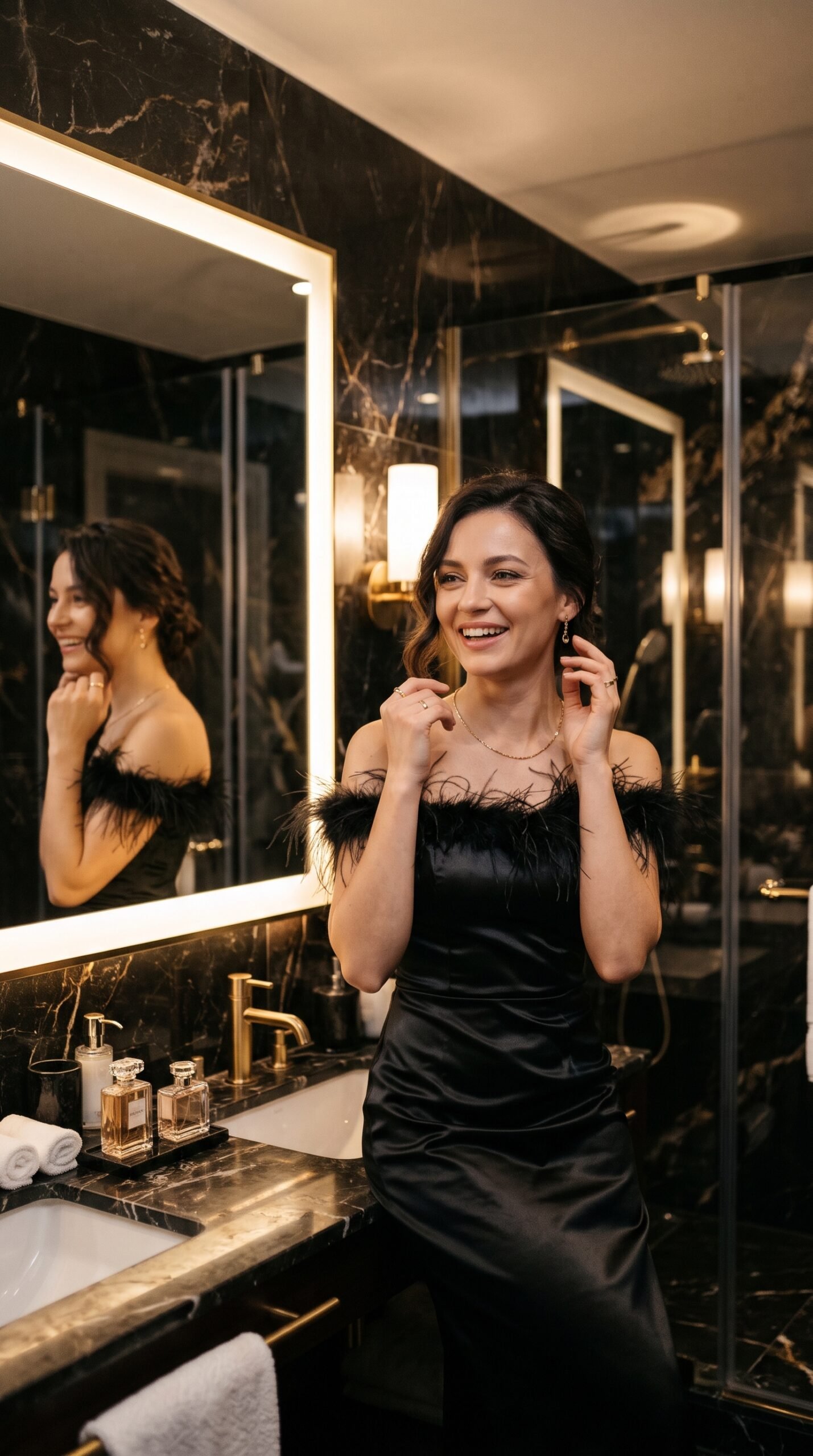
In this tutorial, we will explore how to create a beautiful luxury bathroom mirror dance video using an AI video generator such as PixVerse. The scene features a cheerful young woman wearing an elegant black satin dress with feather trim and gold jewelry, enjoying soft background music in a luxurious bathroom.
The goal is to create a natural-looking 10-second video with smooth animation, realistic reflections, and a cinematic 4K appearance.
What Makes This AI Video Prompt Special?
A good image-to-video prompt describes more than just the subject. It explains how the subject should move, how the camera should behave, and which visual details must remain unchanged.
This prompt focuses on five important elements:
- Natural movements: Gentle shoulder sways, small head tilts, and playful gestures.
- Realistic expressions: Sweet smiles and relaxed, cheerful facial expressions.
- Luxury atmosphere: Dark marble, warm lighting, black satin fabric, and gold accessories.
- Image consistency: Preserving the original face, hairstyle, outfit, jewelry, and background.
- Smooth animation: One continuous shot without sudden cuts or unnatural movements.
These details help guide the AI toward a polished and visually appealing result.
Step-by-Step Video Scene Breakdown
Scene 1: A Sweet Mirror Smile (0–3 Seconds)
The woman gently sways her shoulders to the rhythm of the music. She smiles sweetly at her reflection and makes a tiny, playful head tilt.
The movement should feel natural and effortless rather than like a choreographed dance. Warm lighting highlights the satin dress and the luxurious bathroom interior.
Scene 2: Enjoying the Music (3–6 Seconds)
She softly moves her head to the beat, briefly closes her eyes, and smiles with a carefree expression.
The animation should maintain realistic facial details, smooth movement, and consistent reflections in the mirror.
Scene 3: A Playful Look Toward the Camera (6–10 Seconds)
She opens her eyes, looks toward the camera through the mirror, and gives a charming smile. She finishes with a small, playful movement of her shoulders and hands.
The video ends naturally without changing her outfit, facial features, or the bathroom background.
Image Generation Prompt:
Create an ultra-realistic, cinematic portrait of a beautiful adult woman wearing an elegant black satin evening dress with delicate black feather trim and tasteful gold jewelry. She stands in a luxurious modern bathroom featuring dark polished marble walls, a large elegant mirror, warm ambient lighting, and refined high-end interior details. Her expression is cheerful, cute, and naturally happy as she enjoys a pleasant moment in front of the mirror. Realistic skin texture, detailed satin fabric, subtle feather details, natural facial proportions, accurate mirror reflections, sophisticated composition, warm luxury lighting, professional photography, ultra-detailed 4K quality, vertical 9:16 composition. No text, no watermark, no distorted hands, and no unrealistic facial features.
Important tip: If you already have a reference image that you want to Scene 3: A Playful Look Toward the Camera (6–10 Seconds)
She opens her eyes, looks toward the camera through the mirror, and gives a charming smile. She finishes with a small, playful movement of her shoulders and hands.
The video ends naturally without changing her outfit, facial features, or the bathroom background.
animate, use that image instead of generating a new one. This helps maintain the original subject’s appearance.
How to Create the Video Using PixVerse
Follow these simple steps:
- Open PixVerse or your preferred AI image-to-video generator.
- Select the image-to-video feature.
- Upload your reference image.
- Copy the video prompt provided below.
- Set the duration to 10 seconds and the aspect ratio to vertical 9:16, if supported.
- Generate the video and review the facial expressions, hand movements, and reflections.
- If necessary, adjust the prompt to reduce unwanted movement or improve image consistency.
Available settings may vary depending on the tool and subscription plan.
Copy the Complete AI Video Prompt
The following prompt combines the three timed movements, visual style, audio direction, and negative prompt into one ready-to-use instruction.
Use it with your reference image to create a consistent luxury mirror dance video.
[Optional: Add your own image-to-video tool link here.]
Tips for Better AI Video Results
1. Use a clear reference image. A sharp image with a clearly visible face and body generally provides a better starting point for animation.
2. Keep the movements subtle. Small shoulder movements and gentle head tilts are often easier to render naturally than complex dance choreography.
3. Specify what must remain unchanged. Mention the face, hairstyle, clothing, jewelry, proportions, and background when visual consistency is important.
4. Include a negative prompt. Instructions against face distortion, extra fingers, flickering, and unwanted scene changes can help reduce common AI video artifacts.
5. Review the final video. Always check the hands, mirror reflections, fabric movement, and facial consistency before publishing.
Create More AI Videos with Meratool
Want to experiment with more creative AI video ideas? Visit Meratool.com to explore useful online tools and discover more AI prompt guides.
Save this prompt, test it with your preferred AI video generator, and experiment with subtle changes to create your own visual style.
Final Thoughts
A well-structured AI video prompt can make image animation more controlled, consistent, and visually appealing. By describing the movement second by second and specifying the lighting, camera behavior, and details to preserve, you give the AI a clearer creative direction.
Try the complete prompt below and use your results to refine the next version.
Original AI Video Prompt
Use the reference image as the first frame. A beautiful young woman wearing an elegant black satin dress with black feather trim and gold jewelry is enjoying her favorite music in a luxurious dark-marble bathroom. She looks cute, cheerful, and naturally happy.
0–3 seconds: She gently sways her shoulders to the rhythm, smiles sweetly at the mirror, and gives a tiny playful head tilt.
3–6 seconds: She softly moves her head to the beat, closes her eyes briefly with enjoyment, and smiles with a cute, carefree expression.
6–10 seconds: She opens her eyes, looks toward the camera through the mirror, gives a charming smile, and makes a small playful dance movement with her shoulders and hands.
Visual style: Ultra-realistic, cinematic 4K, warm luxury lighting, natural skin texture, smooth motion, realistic reflections, elegant black satin fabric movement, and subtle camera movement. Preserve her original facial features, hairstyle, outfit, jewelry, body proportions, and bathroom background.
Audio: Soft, upbeat, feel-good pop music with a gentle rhythm. She enjoys the music naturally without singing or speaking.
Format: Vertical 9:16, 10 seconds, one continuous shot, smooth natural animation.
Negative prompt: No face distortion, no identity changes, no extra fingers, no warped hands, no flickering, no unnatural body movement, no outfit changes, no background changes, no exaggerated expressions, no camera cuts, no text, no watermark.
Leave a Reply